



NQE to Pull Cisco WAP OS Version from Cisco (IOS-XE) WLC's.

  • March 19, 2025
  • 1 reply
  • 95 views

cariddir
Spotter
Forum|alt.badge.img+5

Continuing scripts to pull more information from Cisco WLC’s.


Find my original Cisco WAP post here:


Pre-requisites:

  • Add Custom Command to IOS-XE for collection “show ap image | inc None”
  • Add Tag of “WLC” on your Wireless Controllers
  • WLC’s are on c9800 running IOS-XE
    IOS-XE version is 17.x.x
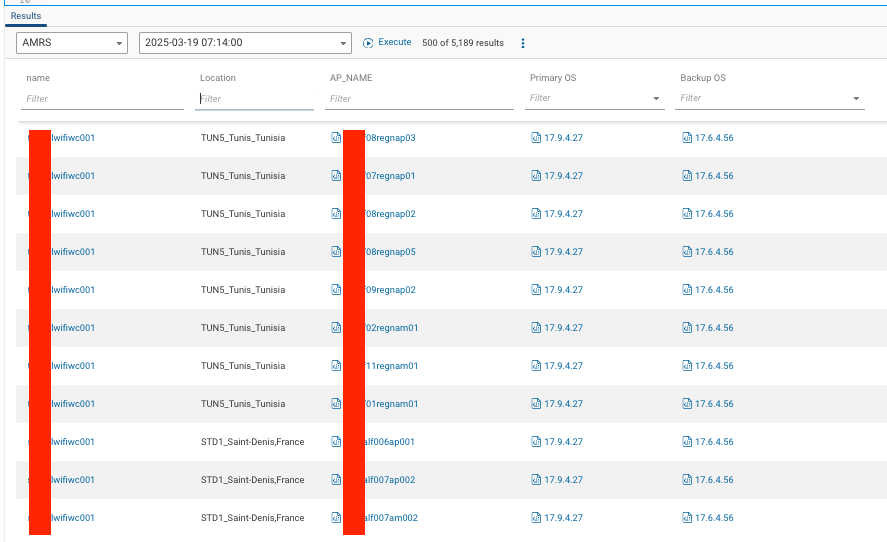
/**
* @intent - pull Name & OS Versions from Cisco AP's via Cisco WLC's
* @description Log into Cisco WLC's "C9800" and pull AP information from the controllers with "show ap image | inc None"
**/

// Pattern of output//
AP_INFO =
```
{APName:string} {PrimaryOS:string} {BackupOS:string}
```;

foreach device in network.devices
let platform = device.platform
foreach Tag in device.tagNames
where Tag == "WLC"

foreach Command in device.outputs.commands
where Command.commandText == "show ap image | inc None"
let parsed = parseConfigBlocks(OS.IOS_XE, Command.response) //parses text into lines
let matchData = blockMatches(parsed, AP_INFO) //applies pattern to lines

foreach x in matchData

select {
name: device.name,
Location: device.locationName,
AP_NAME: x.data.APName,
"Primary OS": x.data.PrimaryOS,
"Backup OS": x.data.BackupOS,
}

 

1 reply

cariddir
Spotter
Forum|alt.badge.img+5
  • Author
  • Spotter
  • March 6, 2026


Additional Enhancements to get Cisco AP’s from Cisco 9800 WLC’s. ​@rob Consolidated two separate Scripts I had, (one pulling software info and the other hardware eol info) into a single, HW/SW script.

Attached are the backend files that feed EoL for Hardware (hw) and recommended software for the AP’s (sw). 

The csv’s needed to be loaded in NQE-->Data Files and then ‘import data file’ 

Create a Custom Collection Group for WLC’s 

show ap sum

// where command.commandText == "show ap sum"

show ap image | inc None

// where command.commandText == "show ap image | inc None"


/**
* @intent Pull AP Name/Model/IP and Image (OS) from Cisco 9800 WLCs
* @description See comments inline.
*/

// Helper: return first matching value from expectedValues that appears in tags.
// Useful to derive environment/region/function manager etc. from device tag list.
export get_list_match_from_tags(tags: Bag<String>,
expectedValues: Bag<String>) =
max(foreach v in expectedValues
where v in tags
select v);

// Convenience exported tag-lookup helpers (wraps get_list_match_from_tags).
// Each returns the first matching tag from the provided list or null if none present.
export get_env_from_tags(tags: Bag<String>)=
get_list_match_from_tags(tags, ["DC", "CoLo", "Branch", "Cloud", "AWS","CoWork"]);

export get_lb_function_from_tags(tags: Bag<String>)=
get_list_match_from_tags(tags, ["lb_LTM", "lb_GTM", "lb_Hypervisor"]);

export get_mgr_from_tags(tags: Bag<String>)=
get_list_match_from_tags(tags, ["N.Cariddi", "J.Willy", "B.Silly"]);

export get_region_from_tags(tags: Bag<String>)=
get_list_match_from_tags(tags, ["EMEA", "AMRS", "APAC", "LATM"]);

export get_function_from_tags(tags: Bag<String>)=
get_list_match_from_tags(tags, ["Firewall", "LB", "Proxy", "WLC", "Router", "Switch", "Controller"]);

// Back-End tables exposed as network extensions (populated in Forward environment)
SW = network.extensions.SW.value;
HW = network.extensions.HW.value;

// Simple parsing patterns for the two controller commands.
// Keep these patterns aligned to the exact CLI column output on your controllers.
apImagePattern = ```
{APName:string} {OS:string}
```;

apSummaryPattern = ```
{APName:string} {BLAH:number} {Model:string} {BLAH_w:string} {BLAH_x:string} {BLAH_y:string} {BLAH_z:string} {IP:ipv4Address}
```;

// NOTE: Ensure your Forward custom-commands for the WLC include EXACTLY
// "show ap sum" and "show ap image | inc None" (strings matched below).
// If the real CLI is "show ap summary", update the where clauses accordingly.

// Devices: Cisco 9800 WLCs are tagged "WLC"
foreach device in network.devices
where "WLC" in device.tagNames

// Cache common metadata once per device to avoid repeated tag lookups.
let env = get_env_from_tags(device.tagNames)
let region = get_region_from_tags(device.tagNames)
let deviceFunction = get_function_from_tags(device.tagNames) // cached for reuse

// ---- Build AP summary table (name/model/ip + HW lifecycle via HW) ----
// This parses the controller 'show ap sum' output into structured rows.
// It then joins each AP model to HW rows by matching hw.PARENT == model.
let apSummaryInfos =
(foreach command in device.outputs.commands
where command.commandText == "show ap sum"
// parseConfigBlocks converts raw CLI text into parseable blocks/lines for blockMatches
let parsed = parseConfigBlocks(OS.IOS_XE, command.response)
let matches = blockMatches(parsed, apSummaryPattern)

// For each AP line matched, join to any HW row(s) with PARENT == model.
// If multiple HW rows exist for a model, one row per match will be produced.
foreach m in matches
foreach hw in HW
where hw.PARENT == m.data.Model

select {
// Device-scoped metadata (cached)
Environment: env,
Region: region,
Function: deviceFunction,

// AP identity and addressing
AP_NAME: m.data.APName,
AP_Model: m.data.Model,
IP_Address: m.data.IP,

// Lifecycle/cost metadata from HW (may be null if no row matched)
"LDoS Year": hw.LDOS_Year,
"Model LDoS Date": hw.LDOS_Date,
Lifecycle: hw.STATUS,
Replace_Cost: hw.TOTAL_COST
})

// ---- Parse AP image output and join to summary + SW approvals via SW ----
// Parse 'show ap image | inc None' which should return "<APName> <OS>" rows.
foreach command in device.outputs.commands
where command.commandText == "show ap image | inc None"
let parsed = parseConfigBlocks(OS.IOS_XE, command.response)
let matches = blockMatches(parsed, apImagePattern)

foreach m in matches
let apName = m.data.APName
let CurrentOS = m.data.OS

// Find the matching AP summary record (by AP_NAME). Use max() as "first/any".
let apSummaryInfo =
max(foreach s in apSummaryInfos
where s.AP_NAME == apName
select s)

// Safely extract model (may be null if apSummaryInfo not found)
let model = apSummaryInfo?.AP_Model

// Find the matching SW row for this AP model in SW.
// Using max() returns a single row or null if none found.
let sw =
max(foreach row in SW
where row.MODEL == model
select row)

let swPresent = isPresent(sw)

// Extract relevant SW approval fields (null-safe)
let imageVendor = sw?.VENDOR
let imageN = sw?.N
let imageN_1 = sw?["N-1"]
let imageN_2 = sw?["N-2"]

// Combine approved releases into a printable string for reporting.
let approved_sw =
if swPresent then join(", ", [imageN, imageN_1, imageN_2]) else ""

// Final output row per AP (combines controller image info, summary info, tables)
select {
Vendor: imageVendor,
Environment: env,
Region: region,
Function: "WAP", // business-facing label
Manager: "J.Bone", // static value in original script
Type: "AP",
Name: apName,
Model: model,
"Model LDoS Date": apSummaryInfo?["Model LDoS Date"],
"LDoS Year": apSummaryInfo?["LDoS Year"],
Lifecycle: apSummaryInfo?.Lifecycle,
"Replace Cost": apSummaryInfo?.Replace_Cost,
OS: device.platform.os,
"Current-OS": CurrentOS,
"Approved OS": approved_sw,
// Compliance checks; returns "Pass"/"Fail" or "N/A" when no SW data exists
"N Compliance": if swPresent then if CurrentOS in [imageN] then "Pass" else "Fail" else "N/A",
"N/N-1/N-2 Compliance": if swPresent
then if CurrentOS in [imageN, imageN_1, imageN_2] then "Pass" else "Fail"
else "N/A",
Location: device.locationName,
Tags: device.tagNames,
"Management IP(s)": apSummaryInfo?.IP_Address
}