Question

NQE query to analyze the module on IOS-XE, IOS, NSOX, EOS, IOS-XR

  • December 21, 2025
  • 2 replies
  • 15 views

Hello,

I am trying to create the NQE query, where i want to see the outputs of show module, show platform, depending upon the platform command might be different and then from those outputs i want to see the modules which are in down state.

2 replies

Christopher
Employee
Forum|alt.badge.img+3
  • Employee
  • December 22, 2025

A lot of the information typical in the output of show module, show platform, etc. has already been normalized into the NQE model, so you don’t have to parse the data again.

For example, if you wanted to list all the devices and their models, you could use the following query:

foreach device in network.devices
select { device: device.name, model: device.platform.model }

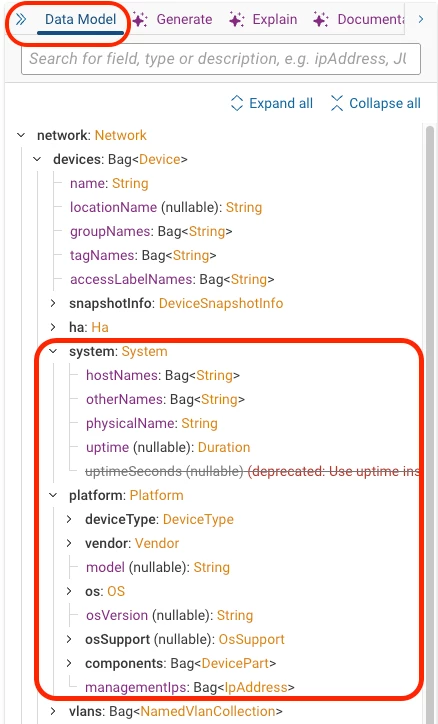
You can find the data that has been normalized into our model by looking at the Data Model on the right side of the NQE screen. The system and platform objects may contain many of the items you are looking for. Each object in the model has an example NQE query that you can use as a starting point for your own query.


  • Employee
  • December 22, 2025

Hi ​@sidhuraj ,before we get to the NQE portion, navigate to collection > collection settings > Custom collection groups and here you can add the custom commands to grab the data. After that, we can work on the NQE portion. We will need to use the matches function to find the states of the modules. You can also email your CSE for assistance if you cannot paste the output here