


Solved

Convert MicroSeconds in NQE

  • September 9, 2024
  • 5 replies
  • 94 views

Forum|alt.badge.img+1

A custom source API call returns a date field in microseconds format.


Does NQE have a built in function to convert?


For example, 1725899407, to Sept. 9, 2024. Currently I don’t need the hours and minutes but in the future it may be necessary.


I’ve searched “date” and “microseconds” in the documentation and online without success.

Best answer by Tyson Henrie

@dakotaglory Apparently this is going to get really easy in release 24.9.  That should be available by the end of this week for Saas.  On-prem it will be next week.


5 replies

Tyson Henrie
Employee
Forum|alt.badge.img+2
  • Employee
  • September 9, 2024

We don’t currently have a built-in function for Unix Epoc time.  We added a “uptime” to the data model.  In that case it is “relative” time.  We then have a function to turn the “relative seconds” to Years, Days, Hours, Minutes.

Let me see what that would look like as a user function.

-Tyson


Forum|alt.badge.img+1
  • Author
  • Spotter
  • September 9, 2024

Oddly extractJson seemed to treat it as a Float. It didn’t like it as type Number so I changed to Float and it passed but not with correct result.   lastUpdateMicros: Float vs. lastUpdateMicros: Number worked.


Tyson Henrie
Employee
Forum|alt.badge.img+2
  • Employee
  • Answer
  • September 9, 2024

@dakotaglory Apparently this is going to get really easy in release 24.9.  That should be available by the end of this week for Saas.  On-prem it will be next week.


Tyson Williams
Employee

Hello @dakotaglory.

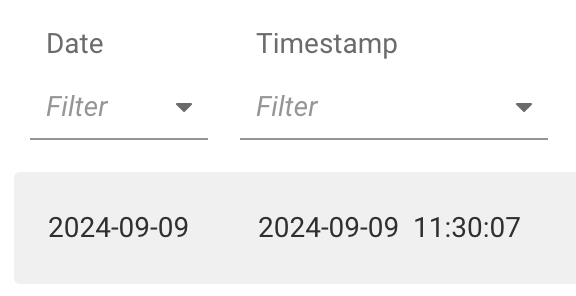
fwd.app was upgraded to 24.9 late on Wednesday.  Now you can write

[{
Date: date("1970-01-01") + seconds(1725899407),
Timestamp: timestamp("1970-01-01T00:00:00Z") + seconds(1725899407),
}]

which gives


Forum|alt.badge.img+1
  • Author
  • Spotter
  • September 23, 2024

That is fantastic news!  Thank you!