

Very often, customers either disable or can’t run LLDP on certain devices, which can cause problems for Forward trying to create a topology. You find isolated icons on the topology which are not connected to anything.
Reasons for this are various:
- Device doesn’t support LLDP or CDP
- Device is at the edge of the network connecting to a third party, so LLDP is turned off for security reasons
- Device is a passive member of a cluster - interfaces aren’t active so LLDP is not running on this cluster member
You could manually add the links into the topology, which is fine until the network is changed. Unless you manually change the map, you’ll potentially be working on an out-of-date topology.
In these situations, Forward allows you to infer a link’s presence based on an interface description. You only need to have a description on one of the two devices for this to work. The documentation is here.
Let us have a quick walk-through of this process
Lab Scenario
Ubuntu-jumphost port eth3 is connected to pop1-mcs02 eth1/1, but no link is appearing on the map:
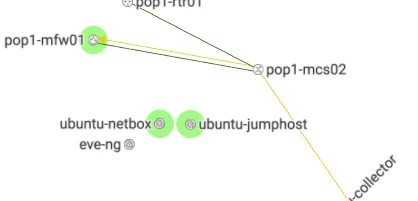
This link is not appearing probably because the Ubuntu host does not run LLDP. (Also I have an odd situation where the pop1-mcs02 (a nexus) is not learning MAC addresses). So I want to infer the Ubuntu host connection based on switch port description.
I put this description on the switch port.
interface Ethernet1/1
  description #ubuntu-jumphost ens3 / pop1-mcs02 e1/1#some other info
As you can see, the format of my description is:
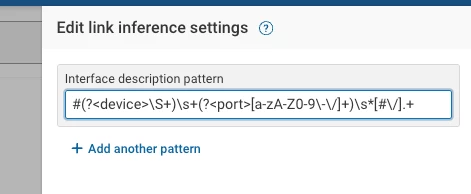
#<remote-device> <remote-port> / <this-device> <this-port>#<optional-extra-data>I add a link inference pattern by editing the map and clicking the infer links button.
The Regular Expression Explained
What does this all mean?
#(?<device>\S+)\s+(?<port>[a-zA-Z0-9\-\/]+)\s*[#\/].+This is a regular expression, which uses patterns to match strings and captures them into variables. The variables Forward needs to get is the remote device name and the remote port that this device is connected to.
[Regex101.com](https://Regex101.com "https://Regex101.com") is a great site for testing out your regular expressions and getting an explanation of how they work:
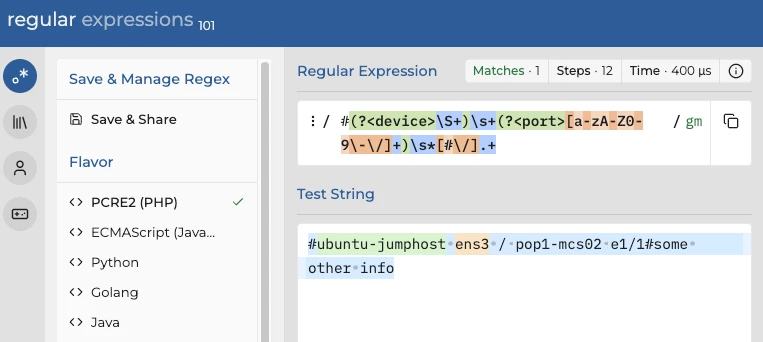
The first character is looking specifically for # mark. In green after that, we have a ‘named capture group’ (?<device>)
Within that named capture group, \S+ is matching on any non-whitespace character, one or more times.
This part of the regex will parse the remote device name that should appear immediately after the first #
Next we have a \s+ which is looking for one or more whitespace characters as a delimiter between the device and the port name.
The second named capture group is (?<port>)
Within that group we match any uppercase (A-Z), lowercase (a-z) or numeric character (0-9), and also the / and — characters. These last two characters have special functions in regex, so we need to ‘escape’ them by putting a backslash before them so they are interpreted as normal characters (\-\/)
There may be a space after the port name, so \s* covers for zero or more whitespaces before the delimiter which is either a # or a /. We are not concerned with capturing the rest of the interface description, so .+ matches any other text until the end of the line.
Result
Since I only just added an interface description to the switch, I take another collection to get the latest config.
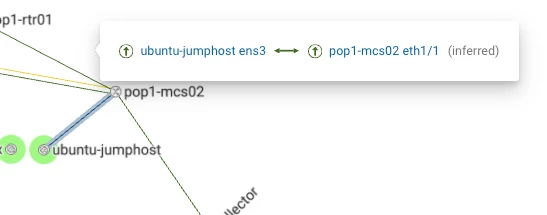
I look back at the map, and see that the link is inferred!
Summary
If you can run LLDP do so, but where you can’t then interface descriptions give you a relatively low-maintenance way to infer links.