Question

How do I add a device from the parent network to an existing workspace network?

  • Sep 30, 2024 12:30 PM UTC
  • 3 replies
  • 253 views
  • Translate All

I was helping some folks in getting familiar with Forward Networks, we were having trouble in adding in new devices (that already exist in the parent network) in to the already created workspace.


The existing options to add devices in the workspace looks to only include ways to create new connections to those devices. But I did not see any way for me to pull in existing devices from the parent network, after the workspace was already created. Does anyone have any insight into this?


3 replies

Christopher
Employee
Forum|alt.badge.img+3
  • Employee
  • Sep 30, 2024 4:27 PM UTC

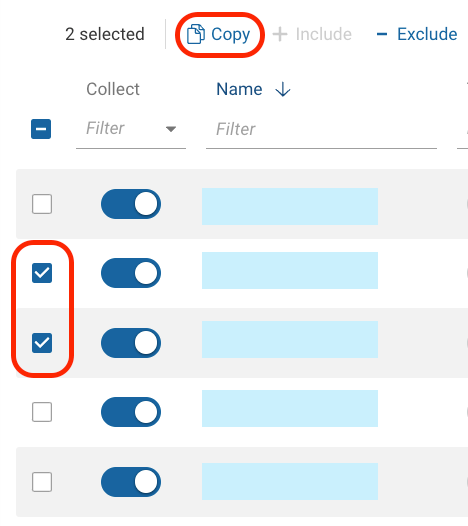
On the sources screen, select the checkbox next to the source or sources you want to add to a workspace network and choose “copy”. This will open a dialog that allows you to select the target workspace.


Translate

  • Author
  • Ramping Up
  • Oct 1, 2024 2:43 PM UTC

Hey Christopher, I tried this method to target different workspaces and an error kept popping up. This occurs when selecting duplicate records to copy over is prompted.

Translate

davetee
Community Manager
Forum|alt.badge.img
  • Community Manager
  • Oct 1, 2024 3:58 PM UTC

Hi @DannyR - A support case has been opened to investigate the error. 


@davetee 

Translate