

Children Lines
This document aims to improve understanding of how NQE parses Cisco-like configuration. It also provides templates for common NQE checks related to configurations.
Forward NQE takes Cisco-like configuration and parses it into a subset of “parent” and “child” lines. The “parent” and “child” relationship is based on the number of indents in front of each line. Each Cisco configuration always starts with a line with no indent in front of it. (e.g. “router bgp 65000”). Some configurations, referred to by Cisco as “global configurations” such as “feature bgp”, do not have additional parameters, and therefore they do not have “children” lines. Others, such as “router bgp 65000”, require additional parameters to configure that particular feature.
In the below example, “router bgp 65000” is the main parent line consisting of “children” that are line 2-4, 7, and 10. Furthermore, the child lines 4, 7 and 10 each have additional “children” lines of their own; line 4 has lines 5-6; line 7 has lines 8-9; and line 10 has lines 11-13. Lastly, line 13 has two additional child lines 14 and 15.
1 router bgp 65000
2 router-id 1.2.3.4
3 log-neighbor-changes
4 address-family ipv4 unicast
5 network 10.1.10.13/32
6 maximum-paths ibgp 8
7 address-family l2vpn evpn
8 maximum-paths 8
9 maximum-paths ibgp 8
10 template peer IBGP
11 remote-as 65001
12 update-source loopback0
13 address-family l2vpn evpn
14 send-community
15 send-community extended
Graphically this can be represented by:
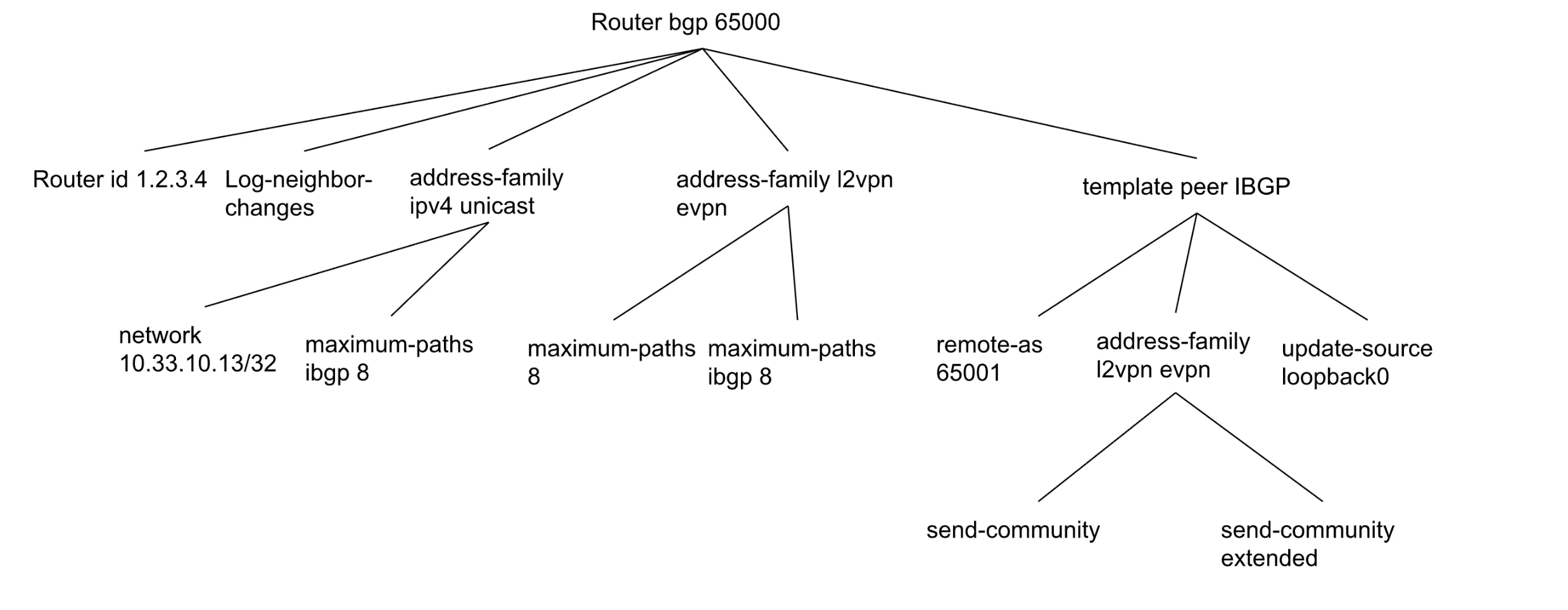
In order to use NQE to access a particular children, the script needs to look for all the parents up to that children. For example, to access send-community extended, the scripts needs to search for “router bgp 65000” -> “template peer IBGP” -> “address-family l2vpn evpn” -> “send community extended”.
Basic Config Templates
Template 1. Find all devices where a “top-level” config exists.
Example: find all with “feature bgp”
Input
- my_config specifies the pattern of the config to be searched.
my_config = `feature bgp`;

foreach device in network.devices
foreach match in patternMatches(device.files.config, my_config)

select {
device: device.name,
line: match.line.text
}
Template 2. Find all parent config that includes a child config
Example: find all config with mtu 9000
Input:
- my_config specifies the pattern of the config to be searched.
my_config = `mtu 9216`;

foreach device in network.devices

foreach match in patternMatches(device.files.config, `interface`)

foreach int_config in patternMatches(match.line.children, my_config)

select {
device: device.name,
interface: match.line.text,
config:int_config.line.text
}
Template 3. Find all parent config that does not have a child config
Example: find all interfaces that doesn’t have a description
Input:
- parent_config specifies the pattern of the config to be searched.
- missing_config specifies the pattern of the child line to be searched.
parent_config= `interface`;
missing_config = `description`;

foreach device in network.devices
foreach match in patternMatches(device.files.config, parent_config)
let all_config = (foreach int_config
                    in patternMatches(match.line.children, missing_config)
                  select int_config.line.text)

where length(all_config) == 0

select {
  device: device.name,
  interface: match.line.text,
  config: (foreach int_config in match.line.children
           select int_config.text)

}
Template 4. Find all parent_config that has config1, but does not have config2
Example: find all interfaces that is in “switchport mode trunk” but doesn’t have “switchport trunk encapsulation dot1q”
Input:
- parent_config specifies the pattern of the config to be searched.
- config1 specifies the config that should exist
- config2 specifies the config that is missing
parent_config= `interface {name:string}`;

config1= `switchport mode trunk`;
config2= `switchport trunk encapsulation dot1q`;

foreach device in network.devices
foreach match in patternMatches(device.files.config, parent_config)

let has_config1 = (foreach int_config
                    in patternMatches(match.line.children, config1)
                  select int_config.line.text)

where length(has_config1) == 1

let has_config2 = (foreach int_config
                    in patternMatches(match.line.children, config2)
                  select int_config.line.text)

where length(has_config2) == 0

select {
  device: device.name,
  interface: match.line.text,
   config: (foreach i in match.line.children select i.text)
}
Golden Device Configuration
Some large configuration snippets such as ACL, route-map, and prefix-lists can be difficult to manage. Consistent configuration across all similar devices is important to ensure consistent networking. In that situation, we can use the concept of choosing a “golden device” with all the correct configuration, which then can be used to compare to all other similar devices.
Template 5. Use golden device
Compare Golden device config against all similar devices.
Example:
Network A labels all core-routers with the name “Core-ABC”, where ABC is a number.
All core routers need to have an “ip access-list” called “pre-authentication”. “Core-001” has all the correct configuration for “pre-authentication”.
Compare the content of “pre-authentication” from “Core-001” against all other Core routers.
Input:
- golden_device is the name of the device which has the correct configuration
- Matching_device is the regex format of the similar devices that will be compared with golden_device
- parent_config is the parent_config which children will be the basis of comparison.
- Methods other than using name matching can be used to get similar devices to be compared with golden_device. Some examples:
- Similar OS versions
- Similar vendor models
- Only device with certain configurations
golden_device = "Core-001";
matching_device = "Core*";
parent_config = `ip access-list pre-authentication`;

golden_config_children =
  foreach device in network.devices
  where device.name == golden_device
  foreach matches in patternMatches(device.files.config, parent_config)
  foreach l in matches.line.children
  select l.text;


foreach device in network.devices
where matches(device.name, matching_device)
let config = if length(foreach matches
                         in patternMatches(device.files.config, parent_config)
                       select matches.line.text) == 0
             then ["NOT CONFIGURED"]
             else (foreach matches
                     in patternMatches(device.files.config, parent_config)
                foreach l in matches.line.children
                   select l.text)

where config != golden_config_children
let missing = golden_config_children - config
select {
name: device.name,
config: config,missing,
golden_config: golden_config_children
}
HA configuration comparison
Mlag peers need consistent configuration to operate in sync. NQE parses Mlag neighbor info (VPC for Cisco NXOS) so that checks can be run comparing configuration between the pair. The below template can be used to compare a snippet of the configuration and find inconsistent entries in that snippet.
Example:
All mlag pairs in the network with ip access-list WEB-IN-ACL need to have the same entries. Find all pairs that do not have the same entries.
Template 6. Find inconsistent mlag config
Input:
- parent_config specifies the parent line, which children lines will be the basis of comparison
parent_config = `ip access-list WEB-IN-ACL`;


foreach device in network.devices
where isPresent(device.ha.mlagPeer)
where device.name < device.ha.mlagPeer
let mlag1_config = (foreach matches
                      in patternMatches(device.files.config, parent_config)
                    wikforeach l in matches.line.children
                    select l.text)
let mlag2_config = (foreach d in network.devices
                    where d.name == device.ha.mlagPeer
                    foreach matches
                      in patternMatches(d.files.config, parent_config)
                    foreach l2 in matches.line.children
                    select l2.text)


where mlag1_config != mlag2_config

select {
  name: device.name,
  mlag1_config,
  peer: device.ha.mlagPeer,
  mlag2_config
}